Using Zi-Find to Locate Properties for Subleasing, Mid-Term Rentals, and Co-Hosting
Purpose
To guide users on how to utilize Zi-Find’s new platform feature for finding properties approved for subleasing, mid-term rentals, and co-hosting.
Procedure
Access Zi-Find:
Navigate to the Zi-Find platform.
Go to the Find Properties section.
Use the Status Toggle:
At the top of the property search page, locate the Status toggle.
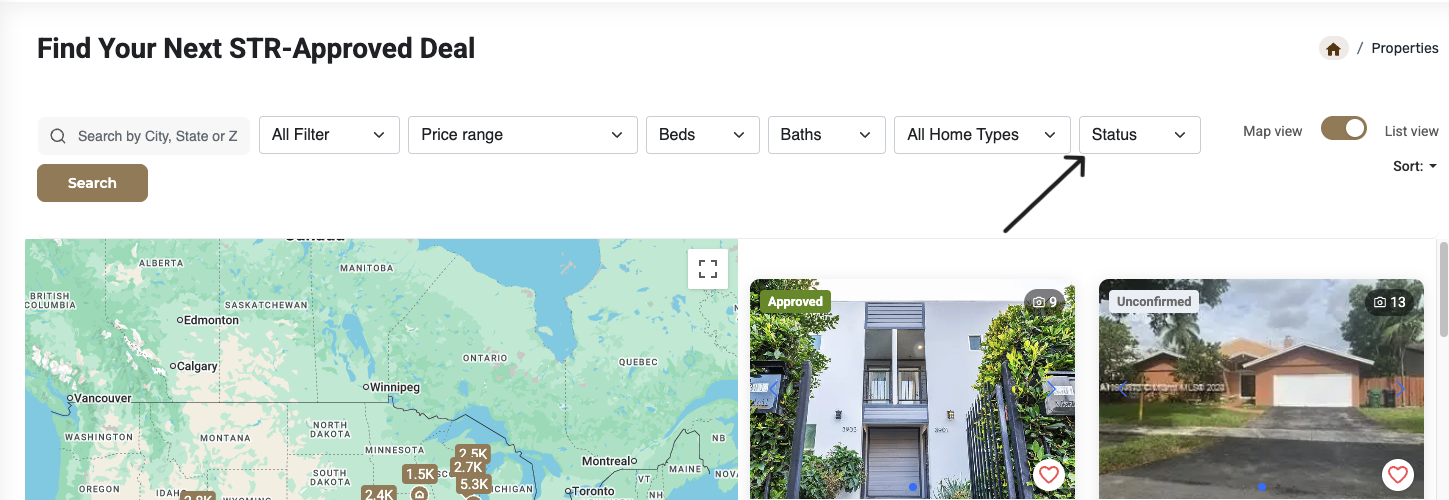
Switch between these options:
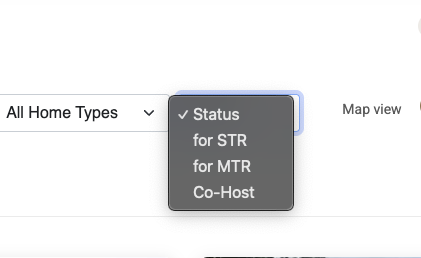
Approved for Sublease (STR)
Approved for Mid-Term Rental
Approved for Co-Hosting
Filter & Sort Properties:
Use sorting options to organize results by:
Newest or oldest listings
Featured properties
Price (high-to-low or low-to-high)
Highest revenue projections
Review Property Data:
For each property, check the back-end data provided (insights & numbers).
Use this data to evaluate property performance and suitability for co-hosting, subleasing, or mid-term rentals.
Notes
This feature is currently live on Zi-Find.
For feedback and support CLICK HERE
Was this article helpful?
That’s Great!
Thank you for your feedback
Sorry! We couldn't be helpful
Thank you for your feedback
Feedback sent
We appreciate your effort and will try to fix the article