New feature update: Now you can see how many users are targeting your requested properties.
Purpose
To guide users in understanding and using the new feature that displays the number of requests made on properties within the Zi-Find platform.
Step-by-Step Process
1. Access the Listing Page
Navigate to a property listing on Zi-Find.
Ensure you're logged in to view complete information.
2. Locate the Request Count
On the property listing page, locate the Request Count.
This number reflects how many users have requested to pursue the property.
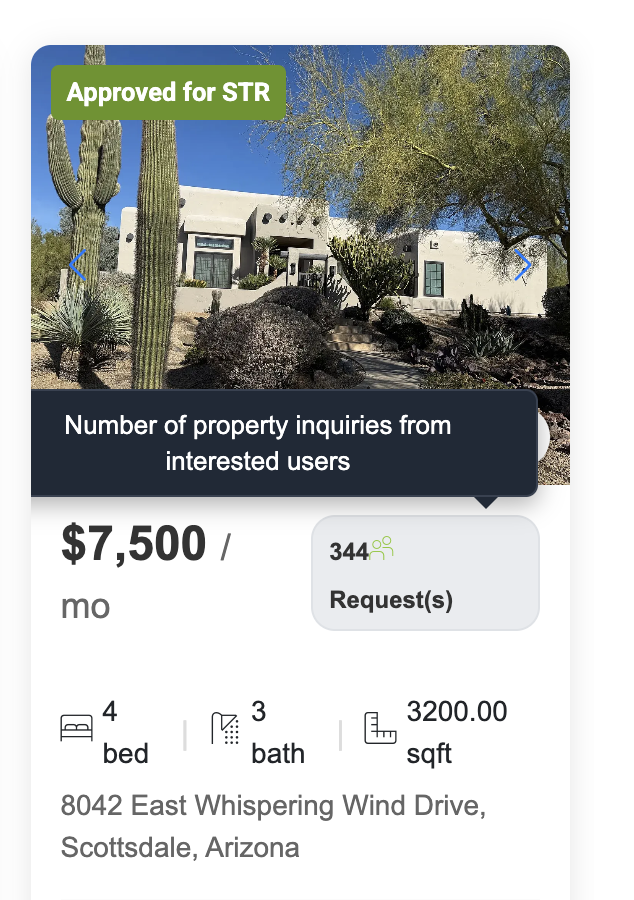
3. Interpret the Tooltip
Hover over the tooltip next to the Request Count.
Tooltip text: “This is the number of users interested in your inquired property.”
4. Review Additional Listing Info
Confirm if the property is approved for STR.
View:
Number of days the property has been listed on Zi-Find.
Rent amount and other property details.

5. Use the Data to make Decisions
Use the request count to assess interest level.
A high number may indicate strong competition.
Use this insight to act promptly or reconsider pursuit based on competition.
Support and Feedback
Leave comments or questions via:
YouTube video comment section.
Instagram DMs or posts.
Feedback portal at Zi-Find.canny.io
Was this article helpful?
That’s Great!
Thank you for your feedback
Sorry! We couldn't be helpful
Thank you for your feedback
Feedback sent
We appreciate your effort and will try to fix the article